awk
匹配
# Let's get the first line
# in awk, NR means number of line
awk 'NR==1' cichlids.imiss
# get the tenth line
awk 'NR==10' cichlids.imiss

# Get only every 20th line
awk 'NR%20==0' cichlids.imiss

# awk can be used like grep to select all lines with a specific word such as "TI" which is found in five sample names.
awk '/Sa/' cichlids.imiss
# this gives the same output as
grep "Sa" cichlids.imiss

# Let's use awk for something else that grep cannot do
# Get all samples with more than 1% missing data
# note: $5 means fifth column
awk '$5>0.01' cichlids.imiss

# you can can also combine the previous codes to select only lines with Sa with more than 1% missing data
awk '/Sa/ && $5>0.01' cichlids.imiss
# Of the samples with missing data proportion above 0.01, print the first column ($1) which contains the individual labels
awk '{if($5>0.01) print $1}' cichlids.imiss
# with if() we can define a specific condition that needs to be fulfilled (e.g. column 5 needs to be greater than 0.01)

# We could also specify now that the letters Sa need to be in the first column and the fifth column needs to be higher than 0.005.
awk '{if($1~/Sa/ && $5>0.005) print $1}' cichlids.imiss
# Note that && means that both conditions need to be true. You could specify lots of different conditions.

# if we now wanted to print the entire line fulfilling both conditions (containing Sa and >0.5% missing data), we have to specify print $0 ($0 stands for the entire line)
awk '{if($1~/Sa/ && $5>0.005) print $0}' cichlids.imiss
开始和结尾
如果我们想在读取行之前或之后做一些事情,我们可以分别在主代码{}之前或之后使用 BEGIN{}和 END{}。
# Let's use END{} to get the mean missing data proportion. The part in END{} is preformed after going through all lines. a is a variable that will sum up the column five entries (missing data proportions). In the end statement, we specify that it should calculate the sum of missing data proportions divided by the number of lines.
awk '{a+=$5}END{print a/NR}' cichlids.imiss

# Actually the header is still in here, so let's skip the first line
awk '{if(NR>1) a+=$5}END{print a/(NR-1)}' cichlids.imiss

# Now if we want to get the mean missing data proportion per group
# we need to first combine the two files to get the missing data proportion and group information in a single file.

# Let's have a look at their structure again
head cichlids.info
head cichlids.imiss

# We cannot just paste them together as they are sorted in different ways
# Therefore, we need to sort the files First
sort -k 1 cichlids.info > cichlids.info.sorted

# Or we can just do that directly without rewriting them by using <() which makes linux interpret the output of the command between the brackets as a file
# This is a useful alternative to generating lots of intermediate files
# Let's join the two files by the first column each. (-1 1) specifies that it should take the first column in the first file and (-2 1) that it should also use the first column of the second file.
join -1 1 -2 1 cichlids.info.sorted <(sort -k 1 cichlids.imiss) > cichlids.info.full

# Now annoyingly the header is somewhere in between, let's move it to the beginning
# This code first gets the line containing INDV and then all lines not containing INDV and writes everything into a new file.
cat <(grep INDV cichlids.info.full) <(grep -v INDV cichlids.info.full) > cichlids.info.full.tmp
# let's overwrite the full file with the tmp file that has the header in the correct position
mv cichlids.info.full.tmp cichlids.info.full

# Let's check how many samples we find in each group
cut -f 2 cichlids.info.full | sort | uniq -c

# Get the mean missing data proportion per group
awk '{missing[$7]+=$5; count[$7]++}END{for(g in missing){print g,missing[g]/count[g]}}' cichlids.info.full  | column -t

# Add a new column with the individual name (column 1, e.g. ind1) and group information (column 7, e.g. piscivore) combined, e.g. ind1_piscivore
# To make it neater to look at, I pipe it into column -t which shows the result with all columns aligned
awk '{print $0"\t"$1"_"$7}' cichlids.info.full | column -t

# replace the fifth column by this new combined individual and group information
awk '{$5=$1"_"$7; print $0}' cichlids.info.full | head | column -t

# You can also modify the numbers, change the proportion of missing data to percent of missing data (x100)
awk '{$5=$5*100; print $0}' cichlids.info.full | head | column -t

# Order the lines of cichlids.imiss according to the order of individuals in cichlids.info
awk 'FNR==NR {file1array[$1] = $0; next} $1 in file1array {print file1array[$1]}' cichlids.imiss cichlids.info
# If specifying two files, NR counts the lines of both files together, whereas FNR starts again at 0 when counting the lines of the second file. Therefore, FNR=NR is only true for the first file. We can read in the lines of the first file into an array called file1array. The key for the array is the first column and thus the individual name. The first file is then printed out in the order of the second file. For each individual (column 1 entry) in the second file, it will print the corresponding line of file one saved in the array.
# 如何通过数组实现按第二个文件的顺序输出第一个文件的内容

# We could also write that it should in addition also give the second column of the second file (group information) and write this into a new file.
awk 'FNR==NR {file2array[$1] = $0; next} $1 in file2array {print file2array[$1]"\t"$2}' cichlids.imiss cichlids.info > cichlids.imiss.info
行列转换
1. 一行变多行
需要将如下格式转换成“一个基因号对应一个 GO 号”
$ cat pta_go.txt
PITA_000018514-RA GO:0003700,GO:0005634,GO:0006355,GO:0043565
PITA_000094612-RA GO:0005618,GO:0006073,GO:0016762,GO:0048046
PITA_000087838-RA GO:0008762,GO:0016491,GO:0050660,GO:0055114
PITA_000082501-RA       GO:0003824,GO:0008152
PITA_000063616-RA       GO:0030247
$ awk '{gsub(/,/, "\n"$1"\t");print}' pta_go.txt > pta_go.annot
$ cat pta_go.annot
PITA_000018514-RA GO:0003700
PITA_000018514-RA       GO:0005634
PITA_000018514-RA       GO:0006355
PITA_000018514-RA       GO:0043565
PITA_000094612-RA GO:0005618
PITA_000094612-RA       GO:0006073
PITA_000094612-RA       GO:0016762
PITA_000094612-RA       GO:0048046
PITA_000087838-RA GO:0008762
PITA_000087838-RA       GO:0016491
PITA_000087838-RA       GO:0050660
PITA_000087838-RA       GO:0055114
PITA_000082501-RA       GO:0003824
PITA_000082501-RA       GO:0008152
PITA_000063616-RA       GO:0030247
原理就是将所有的逗号 , 依次替换成 "\n"$1"\t";而不含有逗号的则照常打印出来。
2. 多行变一行
$ awk '{a[$1]=($1 in a ? a[$1]","$2 : $0)} END{for (k in a) print a[k]}' pta_go.annot
PITA_000018514-RA GO:0003700,GO:0005634,GO:0006355,GO:0043565
PITA_000082501-RA       GO:0003824,GO:0008152
PITA_000094612-RA GO:0005618,GO:0006073,GO:0016762,GO:0048046
PITA_000063616-RA       GO:0030247
PITA_000087838-RA GO:0008762,GO:0016491,GO:0050660,GO:0055114
即将文件 pta_go.annot 的格式转成文件 pta_go.txt 的格式
这里用到了三目运算符?:,? 代表是,而: 代表否。如:
$ awk 'BEGIN{a="b";print a=="b" ? "ok" : "err"}' # 变量 a 与字符“b”相同
ok
$ awk 'BEGIN{a="b";print a=="c" ? "ok" : "err"}' # 变量 a 与字符“c”不相同
err
所以,a[$1]=($1 in a ? a[$1]","$2 : $0) 的含义是:$1 如果是第一次出现,将$0存入数组a中,数组的下标是$1;如果$1在数组 a 中,表明其出现两次或以上时,则将a[$1](代表之前的 $0)和 $2 存入数组 a 中(即更新数组)。
当该语句执行完毕后,执行 END 语句块,将数组a的结果打印出来。
if条件判断
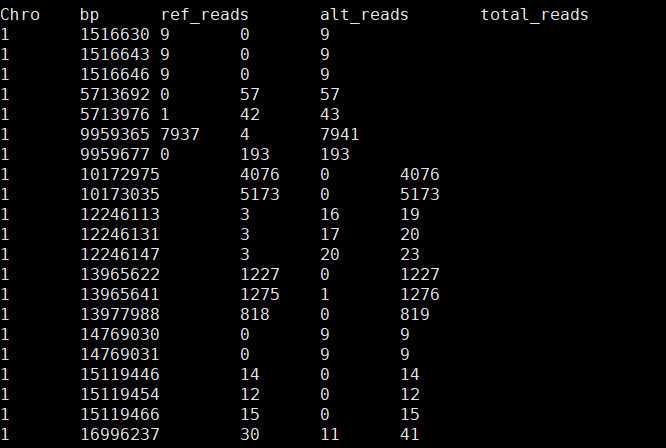
把ref_reads/total_reads=1或者0 的位点用一个记号给它标记出来,以及把alt_reads<=3且ref_reads/alt_reads>10 和ref_reads<=3且alt_reads/ref_reads>10的位点用相同的记号给它标记出来,标记的记号放到第7列就行
sed '1d' /stor9000/apps/users/NWSUAF/2018110135/my_projects/Sheep_project/sheep_data/ase_version_genome/jirou_zhifang_F1/site_genotype/test_1_10banjianji.file | awk '{print $0"\t"$3/$5}' |sed 's/0\..*$/n/g' |sed 's/1$/y/g'| sed 's/0$/y/g' | awk '{if ($4>0 && $4<=3 && $3/$4>10) print $0"\tyes"; else if ($3>0 && $3<=3 && $4/$3>10) print $0"\tyes"; else print $0"\tno"}' |sed '1i Chro\tbp\tref_reads\talt_reads\ttotal_reads\tref/total=1/0\tref/alt>10' |les
gsub进行条件替换
awk '{if ($14!="intergenic") gsub($16"\t"$17,$16"\t\t"$17);print $0 }'
指定多个分隔符
-F " |_" 两种分割符号
基本运算
求平均数:

awk '{sum+=$1} END {print "Average =", sum/NR}' dist_50K_2


统计第一列的和

awk -F'\t' -v sum=0 '{sum += $1} END{print sum}' file_name

统计每一列的和

awk '{ for (i=1;i<=NF;i++)sum+=$i;print sum;sum=0 } ' 111


删除前3列

awk '{$1="";$2="";$3="";print $0}'  filename > newfile


每行最后插入一个字符

命令:awk '{print $0"X"}' text
行列转置
awk '{for(i=1;i<=NF;i=i+1){a[NR,i]=$i}}END{for(j=1;j<=NF;j++){str=a[1,j];for(i=2;i<=NR;i++){str=str " " a[i,j]}print str}}' gtt > gtt.trans
数组
awk -F "\t" ' { if($3 ~ /Burrito/) counts[$3] += $2 } END { print counts["Chicken Burrito"] }' orders.tsv
awk -F "\t" ' { if($3 ~ /Burrito/) counts[$3] += $2 } END { for(k in counts) print(k, counts[k]) }' orders.tsv
替换与截取函数
核心区别
|sub|substr|
|---|---|---|
|用途|替换(substitution)|截取(substring)|
|操作方式|用正则匹配并替换|按位置提取字符|
|修改原变量|✓ 直接修改|✗ 不修改|
|返回值|替换次数(0或1)|提取的字符串|
具体对比
bash
echo "$19.99" | awk '{
  # substr: 截取(不修改原值)
  price1 = substr($1, 2)     # 从第2个字符开始截取
  print "substr返回:", price1  # 19.99
  print "原值$1:", $1          # $19.99 (未变)
}'

echo "$19.99" | awk '{
  # sub: 替换(修改原值)
  n = sub(/\$/, "", $1)      # 用空字符串替换$符号
  print "sub返回:", n          # 1 (替换了1次)
  print "修改后$1:", $1        # 19.99 (已变)
}'
使用场景
substr - 固定位置截取
bash
# 提取基因ID前缀: ENSG00000123456 → ENSG
awk '{print substr($1, 1, 4)}' genes.txt

# 提取日期: 20250124 → 2025-01-24
awk '{print substr($1,1,4)"-"substr($1,5,2)"-"substr($1,7,2)}'
sub - 模式替换
bash
# 去掉货币符号(不知道是$还是¥)
awk '{sub(/[$¥]/, "", $2); print $2}'

# 去掉基因ID版本号: ENSG00000123456.2 → ENSG00000123456
awk '{sub(/\.[0-9]+$/, "", $1); print $1}' genes.txt

# 替换空格为下划线
awk '{sub(/ /, "_", $3); print $3}'
相关函数
bash
sub(regex, replacement, target)   # 替换第一个匹配
gsub(regex, replacement, target)  # 替换所有匹配(global)
substr(string, start, length)     # 字符串截取
记忆技巧:
- substitute - 替换
- substring - 子字符串